Server Status and Live Metrics
Open a server's Overview to check its state before joining, changing settings, or leaving it unattended. Status and metrics update while the page is open.
Status reference
| Status | Meaning and next step |
|---|---|
| Stopped | Hosting and hourly billing are paused. Select Start when ready to return. |
| Starting | Hosting is being prepared and the game is launching. Wait before joining. |
| Running | Startup completed. Use current connection details; some games still need a brief final load. |
| Stopping | Shutdown is in progress. Wait for Stopped and check for save warnings. |
| Error | A problem was reported. Read the message and Activity Log; this is not a billing pause. |
| Deleting | Permanent removal is underway. Wait; completed deletion cannot be undone through the Console. |
Starting, Running, and Error can be billed. If you want to end an active or errored session, use Stop when available and verify Stopped. Closing the browser does not stop the server.
Read metrics and timers
CPU, memory, and reported player count help you observe the current workload. These are periodic readings, not an instant connection test. A short spike does not by itself justify resizing. If values appear stale, reopen the page and compare the status message before taking action.
- Banked Hour shows paid time remaining before another hourly charge, or time held for the next start while stopped.
- Current Session tracks the current run and stops increasing when that session ends.
- Total Uptime includes completed runtime and the current active session.
These counters describe this server's usage, not an availability guarantee or service-level measurement. For billing rules, see hourly billing help.
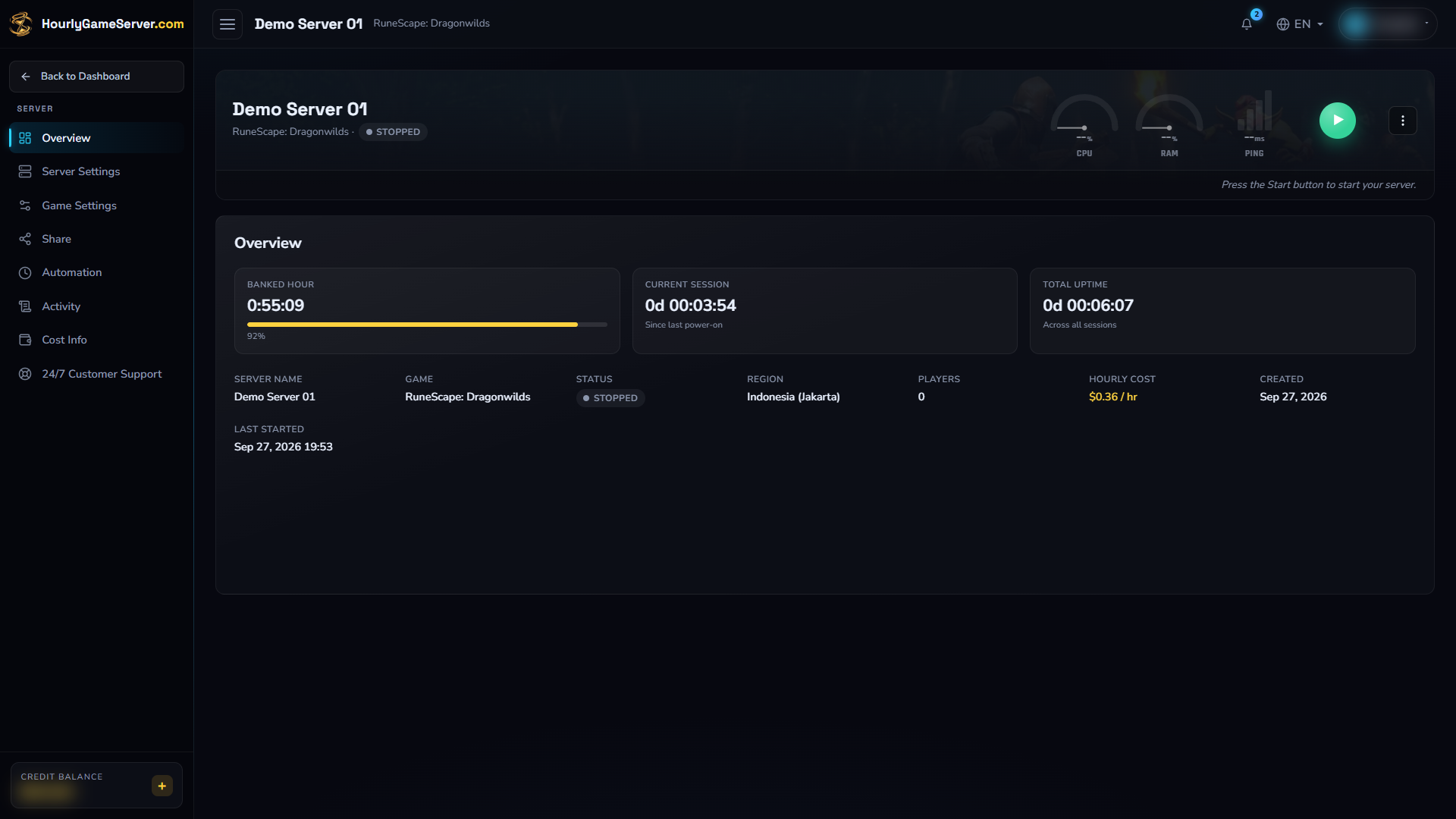
An existing stopped Dragonwilds example with Banked Hour, Current Session, and Total Uptime. Players cannot connect while it is stopped. The displayed USD rate is an example, not a quote for your server. No server was started for this screenshot.
For the safe session procedure, see Starting and Stopping.
Busy states and missing controls
Starting, Stopping, and Deleting limit settings and lifecycle actions while work is in progress. Controls can also be hidden or read-only because of your role or the game's supported features. Do not repeatedly submit an action because the status has not changed yet.
Investigate an Error
Read Overview and Activity Log together. For startup problems, follow My Server Won't Start. For a save warning, use save-data troubleshooting.
If the problem persists, give support the game, status message, last action, and time with timezone. Do not delete the server as a first troubleshooting step; deletion permanently removes saves.