Minecraft: Java Edition
Before you begin
Use this guide to create a Minecraft: Java Edition server, join its world, and manage settings, mods, and players.
- Every player needs Minecraft: Java Edition on a computer, signed in with an account that can play multiplayer. Bedrock Edition on consoles, mobile devices, or Windows does not join this Java server through the standard connection method.
- Match the server's Minecraft version. For a modded world, also agree on the loader and any mods required on players' computers.
- Sign in to hourlygameserver.com and have enough credits for the displayed first hourly charge.
- Read the Minecraft EULA before hosting.
Choose a region and size
Choose a region near most of your players. Compare the available Server tier, Server size, resources, and hourly price rather than selecting by player count alone.
Start with Small for a new vanilla world and a small group. Larger explored worlds, many players, heavy redstone, and demanding mods can justify Medium or Large. Higher View Distance and Simulation Distance also increase the workload. A large Max Players value is a connection limit, not a guarantee that the chosen size can handle that many active players.
After a normal play session, check CPU and Memory on Overview. Use Server Settings to compare a different size if needed.
Create the server
- Open Minecraft: Java Edition from the games catalog and enter its creation wizard.
- Continue to Server Configuration. Set Server Name, region, tier, and size. The generic Password field is not a Minecraft Java login password; do not rely on it to restrict entry.
- Open Game Settings. Choose the rules below and expand each settings group you need. Keep Online Mode on so player accounts are authenticated.
- For mods, configure the loader and version and select compatible projects under Install Mods before continuing. Leave the list empty for vanilla Minecraft.
- Read Review, check the hourly charge, then select Create Server once.
- Open the server in Console and follow Overview until it is Running. If it remains Stopped because there are insufficient credits, top up and select Start.
Creating and starting hosting incurs the displayed hourly charge. Waiting in a Minecraft menu does not stop the rented server.
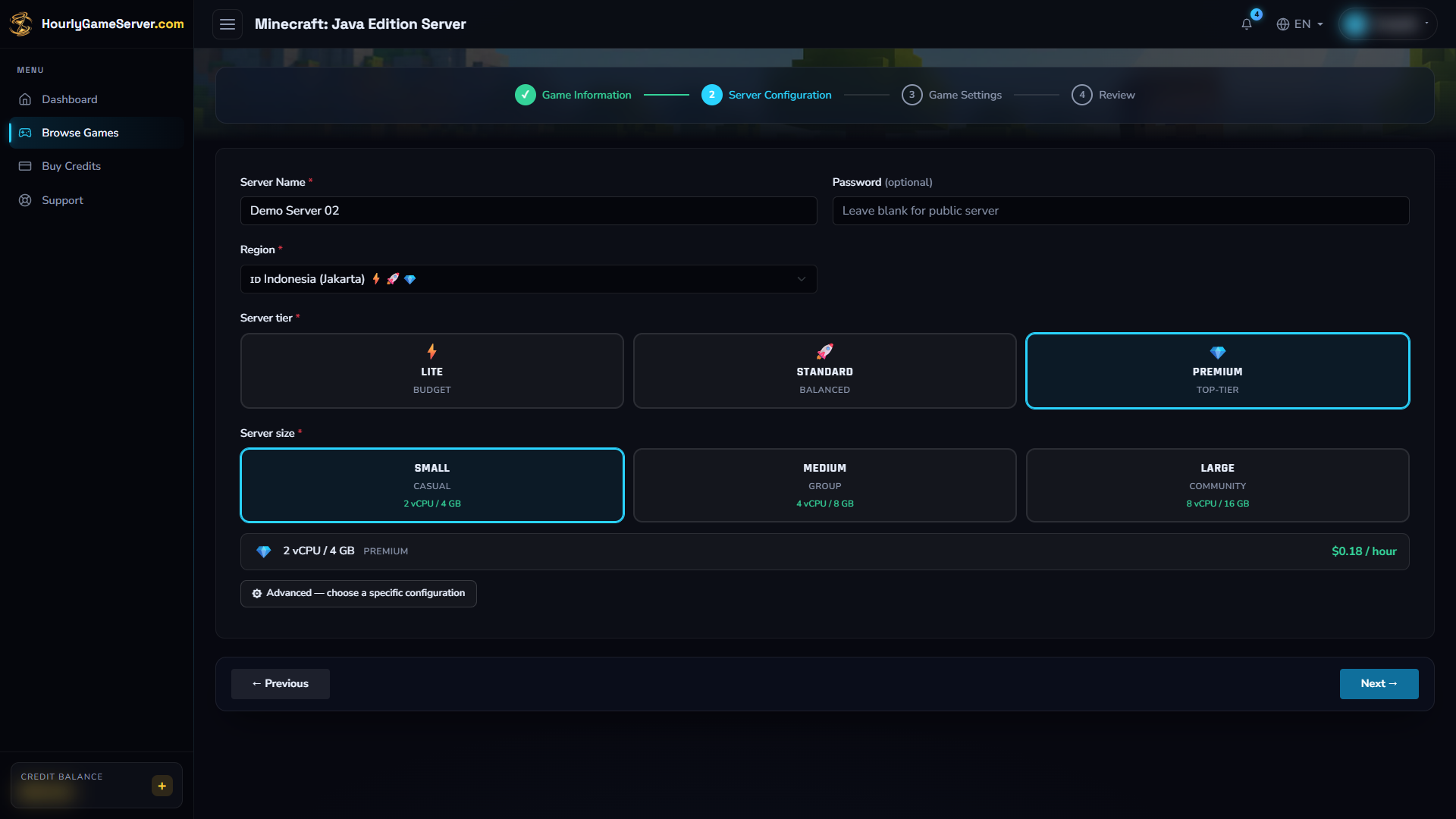
Server Configuration lets you compare capacity before continuing. Jakarta, Premium, and Small are example selections, not requirements; choose for your players' location and world workload.
Choose game settings
The following are the creation form's defaults and allowed inputs. An existing server may show different saved values. Game-version support still matters: an exposed setting is not a promise that every Minecraft release or mod loader implements it identically.
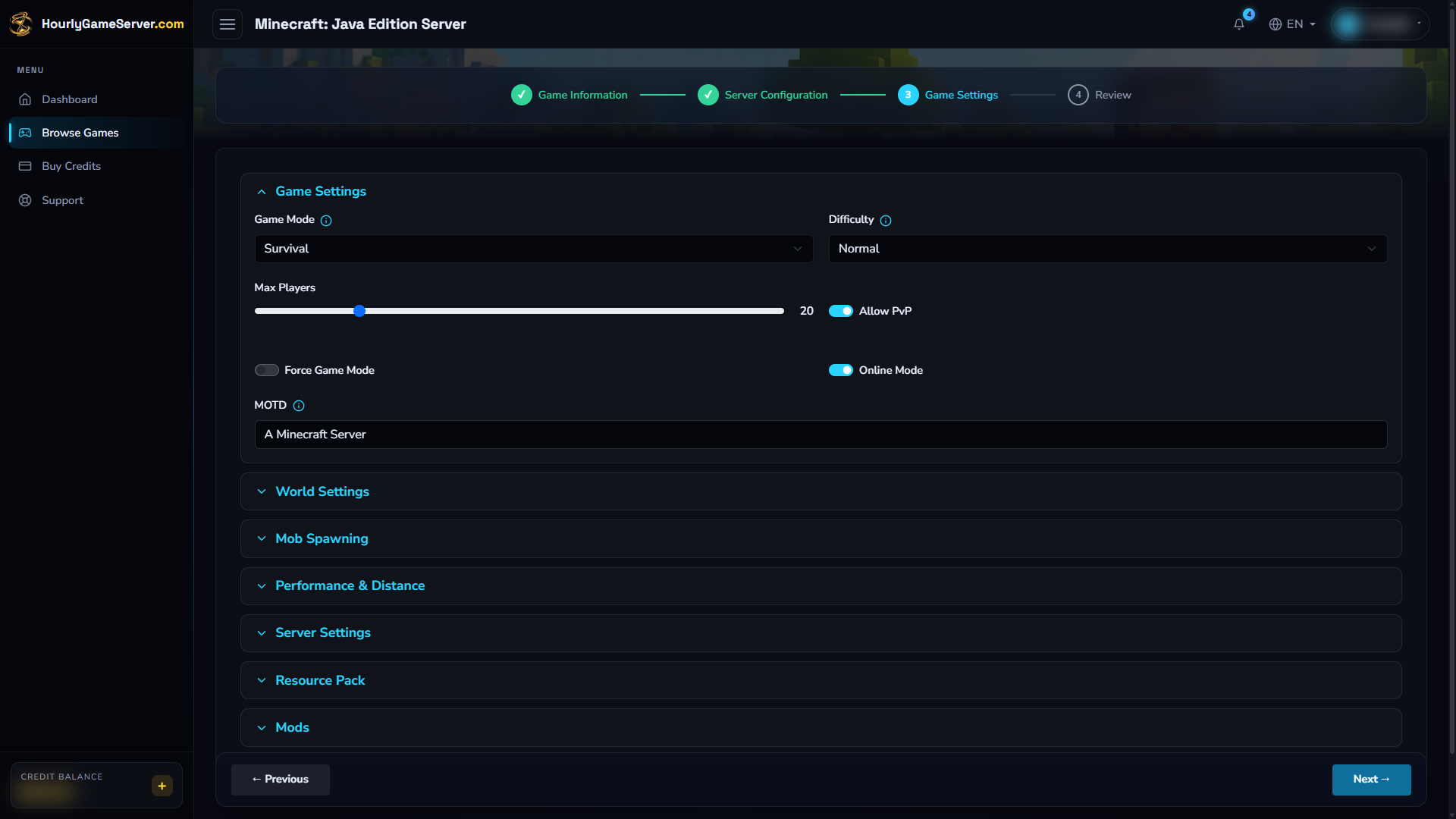
The first Game Settings group opens by default. Expand Performance & Distance or Mods when you need simulation-distance or mod-related controls.
| Control | Defaults, choices, and guidance |
|---|---|
| Game Mode | Default: Survival. Also Creative, Adventure, Hardcore. Agree on the play style before starting. Hardcore has permanent-death consequences. |
| Difficulty | Default: Normal. Choices: Peaceful, Easy, Normal, Hard. Controls the survival challenge; Peaceful affects hostile mobs. |
| Max Players | Default: 20; range 1–100. Limit simultaneous connections to suit your group and resources. |
| Allow PvP / Force Game Mode | Defaults: on / off. PvP allows players to hurt each other; forcing the mode applies the chosen mode on joining. |
| Online Mode | Default: on. Keep account authentication enabled. |
| MOTD | Default: A Minecraft Server. The message shown in the Minecraft server list, separate from the hosting server's name. |
| World Type / World Seed | Defaults: DEFAULT / blank. Types include FLAT, LARGEBIOMES, AMPLIFIED, and SINGLE_BIOME_SURFACE. A blank seed lets the game choose one. Decide before world generation. |
| Generate Structures | Default: on. Controls generation such as villages, where supported by the chosen world type. |
| Max Build Height / Max World Size | Defaults: 320 (64–320) / 29999984 (1000–29999984). Advanced, version-dependent world limits. These do not resize or regenerate saved terrain. |
| Spawn Animals / Spawn Monsters / Spawn NPCs | Defaults: all on. Adjust natural spawning; these switches do not remove every existing creature. |
| View Distance / Simulation Distance | Defaults: both 10; range 3–32 chunks. Lower these first when chunk loading or simulation overloads the server. |
| Enable Command Blocks | Default: off. Enable only for worlds that need them and trusted administrators. |
| Player Idle Timeout | Default: 0; range 0–60 minutes. Zero disables idle kicking. This is not automatic server shutdown. |
| Hide Online Players | Default: off. Hides player-list details from status responses, not access to the server itself. |
| Spawn Protection Radius | Default: 16; range 0–25 blocks. Protects the spawn area from ordinary players; check it when a new player cannot build there. |
| Allow Flight / Allow Nether | Defaults: off / on. Flight tolerance is useful for compatible flying mods; it does not grant flight by itself. |
| Enable Query | Default: off. An advanced query option, not required for normal joining. It does not provide an administration console. |
| Entity Broadcast Range | Default: 100; range 10–1000 percent. Larger ranges may increase network and processing load. |
| Max Tick Time | Default: 60000; range -1–120000 milliseconds. Keep the default unless you understand the watchdog. Disabling it is not a performance fix. |
| Resource Pack URL / Enforce Resource Pack | Defaults: blank / off. Supply a downloadable pack compatible with the client before requiring players to accept it. A resource pack is not a server mod. |
| Mod Loader / Minecraft Version | Defaults: Fabric / blank. Loader choices: Fabric, Quilt, Forge, NeoForge. These settings are used with a non-empty selected mod list; they are not a standalone vanilla-version selector. |
World-generation changes do not rebuild explored chunks. Changing a seed or world type on an established world can make future terrain inconsistent with the old world. Do not delete a server or its save merely to test a setting.
Apply changes safely
- Tell players that the session will end, then select Stop and wait for Stopped.
- Open Game Settings, change the required controls, and select Save Settings.
- Select Start, wait for Running, and reconnect to check the result.
Saving settings alone does not start a stopped server. Wait out any startup or shutdown before editing, and make sure your shared-server role permits settings changes. Use Stop, not Delete, when you want to keep the world for the next session. See Save Data and Backups.
Connect from Minecraft
- Copy Domain Name or IP Address from the server's Console once it is Running.
- Start the matching Minecraft: Java Edition version. Select Multiplayer.
- Choose Add Server to save the connection, or Direct Connection for a one-time join.
- Enter the copied address, for example
play.example.com:25565, withouthttp://orhttps://. Port25565is the default and can normally be omitted. - Join the server. For Add Server, save the entry and select it from your multiplayer list.
Only share the address with people you want to invite. A Console share link grants website access according to its role; it is not the Minecraft server address. Mojang's multiplayer instructions explain the game-side connection process.
Install and maintain mods
Minecraft uses Modrinth projects through Install Mods during creation or the Mods section afterward. No personal Modrinth token is required.
- Choose a compatible Mod Loader and an explicit Minecraft Version in Game Settings. A blank version follows the available latest release, which may not suit your selected mods.
- Search for a project or paste its Modrinth link. Check its supported Minecraft versions, loader, dependencies, and client requirements before adding it. Search results alone are not proof of compatibility with your loader.
- Select Save Mods. While stopped, the selection applies on the next start. If saving while running, Save & Restart interrupts players and restarts the server.
- Allow time for installation, then join with matching client-side requirements. Some mods are server-only; install client mods where the author requires them, rather than copying every server mod to every player automatically.
The integrated picker installs mods, not arbitrary plugin or modpack uploads. Removing content mods can remove blocks or items, or stop an existing world from loading. Change a small number at a time. Changing the Minecraft version or loader can also require a new world; preserve the existing save and check compatibility before switching. Review mod management.
Manage players and administrators
While Running, open Player Management. Minecraft identifies players by their in-game Java username, not a Steam ID.
- Kick disconnects a player now; Ban prevents return until Unban.
- Make Admin grants Minecraft operator rights. Use it only for a trusted player.
- Broadcast Message sends a message to connected players, useful before maintenance.
Allow a short time for the online list to update. In-game operator rights are separate from website roles and do not grant access to billing or server controls. The shared-server role must permit managing players to use these actions.
Troubleshooting
| Symptom | What to check |
|---|---|
| Cannot join or connection refused | Wait for Running, recopy the address, and try :25565. Confirm Java Edition, not Bedrock, and allow Minecraft through your own firewall. |
| Outdated client/server or mod mismatch | Match the Minecraft version, loader, and required mod versions. Do not assume the latest client matches an established modded world. |
| Multiplayer is unavailable or authentication fails | Check your Microsoft account's multiplayer permissions, sign in again, and keep Online Mode enabled. |
| New players cannot break blocks near spawn | Check Spawn Protection Radius and whether they are in Adventure mode. |
| Lag when exploring or using redstone | Lower View Distance and Simulation Distance, compare CPU/Memory, and review heavy mods before increasing size. |
| A seed or world-type change appears ignored | Existing chunks are preserved; these settings do not recreate the current world. |
| Mods fail to start | Recheck project/loader/version support and recent changes. Preserve the save and contact support before removing world-critical mods. |
If the problem continues, use the server's support option with the approximate time, client version, and exact error message. Do not include passwords, tokens, or private account details.