Conan Exiles
Before you begin
This guide takes you from creating a Conan Exiles server to joining and moderating it. The hosted game is Conan Exiles Enhanced. Use a compatible, updated Steam PC Enhanced client, not a Legacy client or console edition. Funcom explains the edition differences in its Enhanced announcement and FAQ. Access to the Isle of Siptah still requires the appropriate DLC.
Sign in to hourlygameserver.com and have enough credits for the first hour. On a shared server, you need permission to change settings or manage players; being an administrator inside Conan does not give you ownership of the hosting account.
Important limitation: several advanced settings appear in the form and can be saved, but are not currently applied to the hosted Enhanced server. In particular, do not assume that turning off a PvP switch makes your world safe for cooperative play. See the settings section before inviting players.
Choose a region and server size
Choose a hosting region close to most players. The hosting region is different from the Server Region browser tag in the game settings.
Conan Exiles has a higher resource baseline than lighter games. Do not choose Small on the size label alone: inspect the actual vCPU and memory offered in your region and choose adequate resources for Conan, even for a new world. An option appearing in the creation form is not a guarantee that it suits your workload. Consider Medium or Large for more players and extensive building; ask support if the available hardware is unclear or appears insufficient. A high Max Players value is a connection limit, not a promise that the selected size can run that many players comfortably.
Compare the available Server tier, Server size, resources, and hourly price before continuing. Once playing, use CPU and Memory on the Console to judge whether a larger size is worthwhile. See choosing a tier and size.
Create the server
- Choose Conan Exiles from the games catalog and open its creation form.
- Enter a recognizable server name and, for a private group, a server password.
- Choose your region, tier, and size, then select Next.
- Expand Server Identity. Set Max Players and an Admin Password different from the joining password. Keep the admin password private.
- Continue to Review. Check the name, hosting choices, passwords, and hourly rate.
- Select Create Server once, then open the server in your Console.
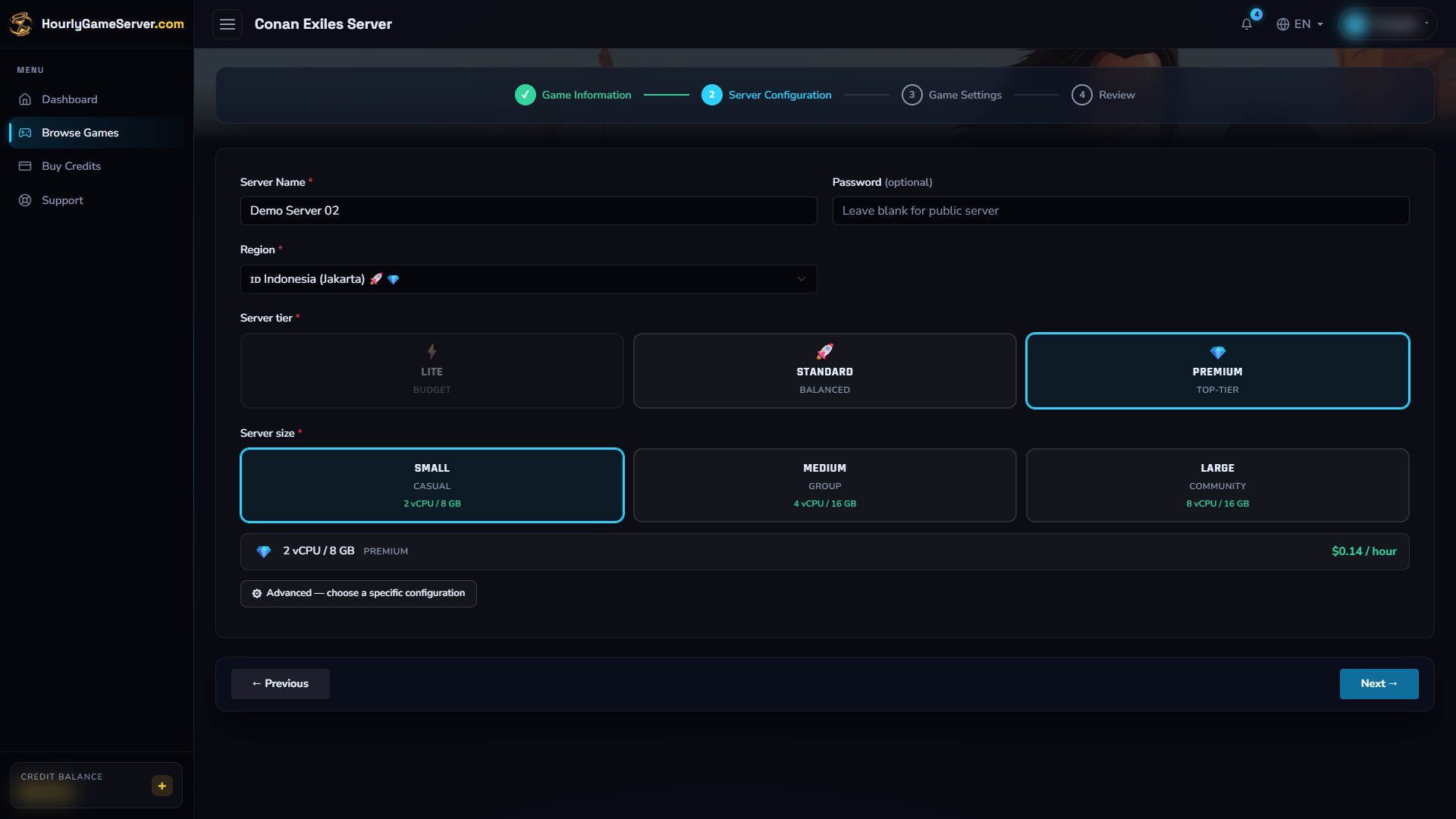
This example shows where hosting choices appear, not a recommended Conan configuration. Check the actual vCPU and memory before choosing; the Small label alone does not establish suitability.
Creation charges the first full hour upfront when your balance can cover it. If there are insufficient credits, the server remains Stopped; top up before selecting Start. Otherwise, follow startup on Overview and wait for Running. Do not create a second server simply because startup is taking time.
Understand the available settings
Settings that are applied
| Control | Default or range | What to use it for |
|---|---|---|
| Server name and joining password | Set during creation | Identify the server and restrict who can join. |
| Max Players | 40; 4–70 | Limit simultaneous connections to suit your actual group and server size. |
| Admin Password | Empty in the form | Set a separate password for trusted in-game administrators. Do not treat an empty value as configured admin access. |
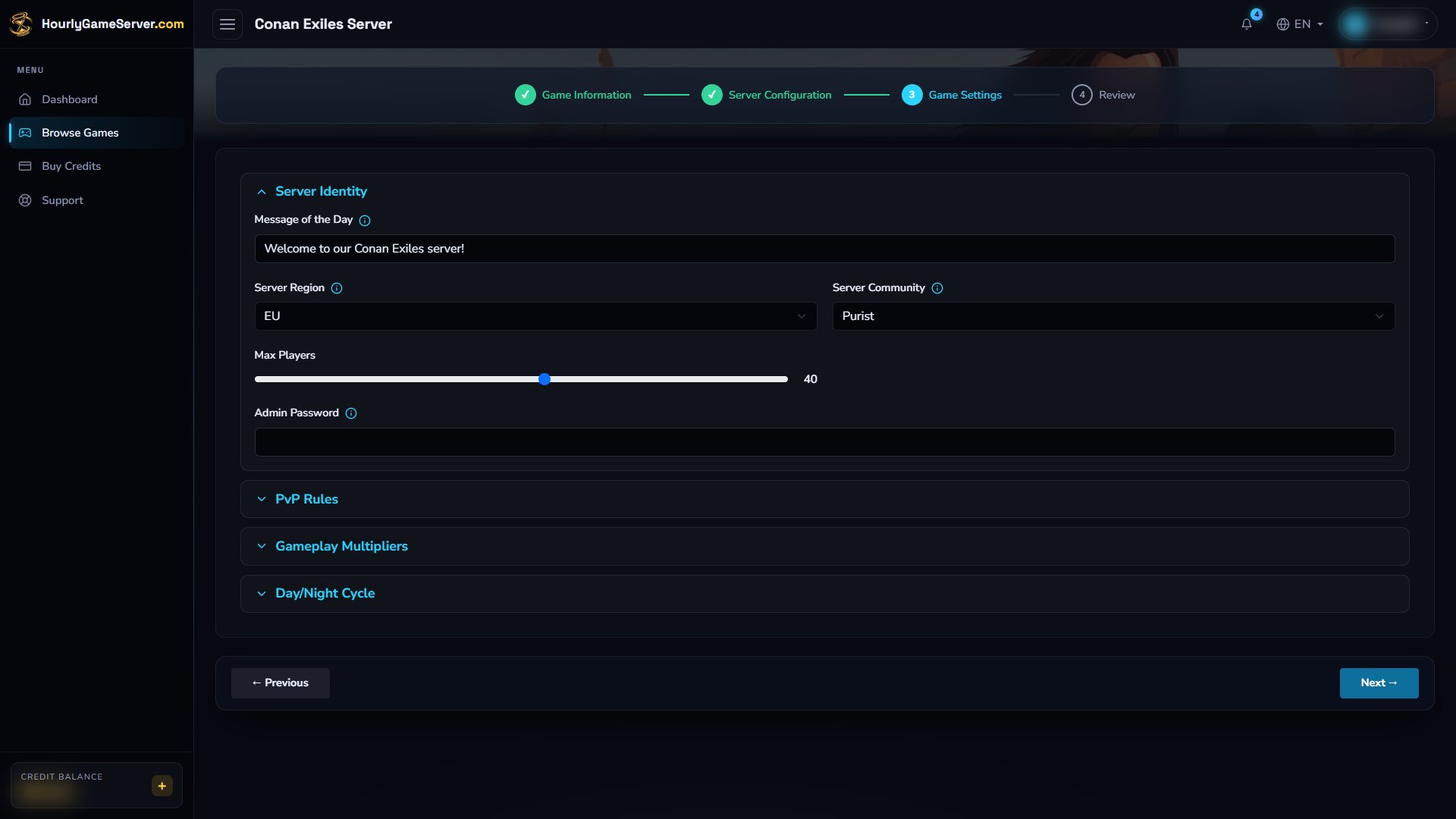
Server Identity contains the player limit and identity settings. Supply a private Admin Password before creating the server if you need administrator access; not every displayed field is currently applied.
Advanced settings currently not applied
The form also saves Message of the Day, Server Region, Server Community, PvP Enabled, PvP Building Damage, PvP Blitz Mode, Nudity Level, XP and harvesting rates, crafting and thrall-conversion multipliers, and day/night speeds. These values are currently not applied to the hosted game, even if they appear again after saving.
For example, the form shows PvP and building damage enabled, XP and harvest at 1, and day/night speeds at 1. Those displayed defaults are not a reliable way to verify the live world's rules. If a particular PvE, progression, or community rule is essential, contact support before relying on it. Repeatedly saving or restarting does not remove this limitation.
Stop, save, and start
- Tell players that they will be disconnected.
- Select Stop in the Console and wait until the status is Stopped.
- Open Game Settings, change the supported settings, and select Save Settings.
- Select Start and wait for Running before reconnecting.
- Reopen the saved settings and verify the intended player limit or administrator access in-game.
Settings are locked during startup and shutdown. A normal stop preserves the world and pauses hourly billing after shutdown completes. Starting again resumes the preserved world and incurs a new first-hour charge. Delete is not a substitute for Stop: deletion permanently removes the server's saves.
Connect from Conan Exiles Enhanced
- Wait for Running, then copy the current IP Address or Domain Name from the Console. Retrieve the joining Password privately if one is set.
- Launch the compatible Enhanced client and open Play Online.
- Find the server by name, or use Direct Connect in the server browser.
- For direct connection, enter the copied address followed by
:7777, and provide the joining password when requested. - Share the same current joining details with your group, not your admin password.
The game connection uses UDP 7777. Browser discovery also uses UDP 7778 and UDP 27015; do not substitute the query port for the game port. These roles are described in Funcom's dedicated-server documentation. You do not need to host a server or forward a game-server port on your own computer.
Administration, players, and mods
While the server is Running, open Player Management to view connected players. Confirm the player's identity before selecting Kick or Ban. Kick disconnects the current session; Ban blocks a return until Unban is used. Broadcast Message sends a notice to the players currently online, which is useful before shutdown.
Conan's administrator access uses the Admin Password inside the game. It is separate from the server joining password and from shared Console permissions. There is no Make Admin action for Conan in Player Management.
There is no Mods section for this hosted game. Conan's general mod support does not mean that Workshop installation or mod uploads are available here.
Troubleshooting
| Symptom | What to check |
|---|---|
| Server is missing from the browser | Wait for Running, remove restrictive browser filters, and try Direct Connect with the current address and port 7777. |
| Version mismatch or incompatible server | Confirm everyone is using the matching Enhanced PC build, not Legacy or a console edition. |
| Password rejected | Use the server joining password, not Admin Password. Check for extra spaces when copying. |
| PvP, rates, or day/night rules did not change | These advanced form settings are not currently applied. Do not keep restarting to try to force them. |
| Player actions unavailable | The server must be Running and your shared role must allow player management. Allow time for the first roster update. |
| Persistent lag or startup error | Review CPU, Memory, the status message, and Activity Log. Contact support with the server name, time, and visible error, never passwords. |